

Written by Igor Todorovski and previously posted on the IBM Community blog
For years, developers running Python on IBM z/OS UNIX hit a frustrating wall whenever they wanted to build real-world applications.
You have probably lived this moment: you create a fresh environment, type pip install cryptography or pip install pydantic, and hit Enter with optimism. Seconds later, your terminal erupts with pages of compiler errors, missing C headers, or incompatible platform settings. Pure-Python libraries installed fine, but the moment an application required native extensions, progress ground to a halt.
Also, PyPI does not distribute binary wheels (.whl) for z/OS. When pip falls back to building from source, it inevitably fails due to missing mainframe build configurations or complex native toolchain requirements. To make matters worse, base Python installations frequently bundled ancient libraries (such as Cryptography 3.3.2 from early 2021), leaving environments exposed to documented CVEs while pip falsely reported “Requirement already satisfied”.
Today, that changes.
The Zopen Community, an Open Mainframe Project hosted by the Linux Foundation, is thrilled to announce a major milestone for Python on z/OS:
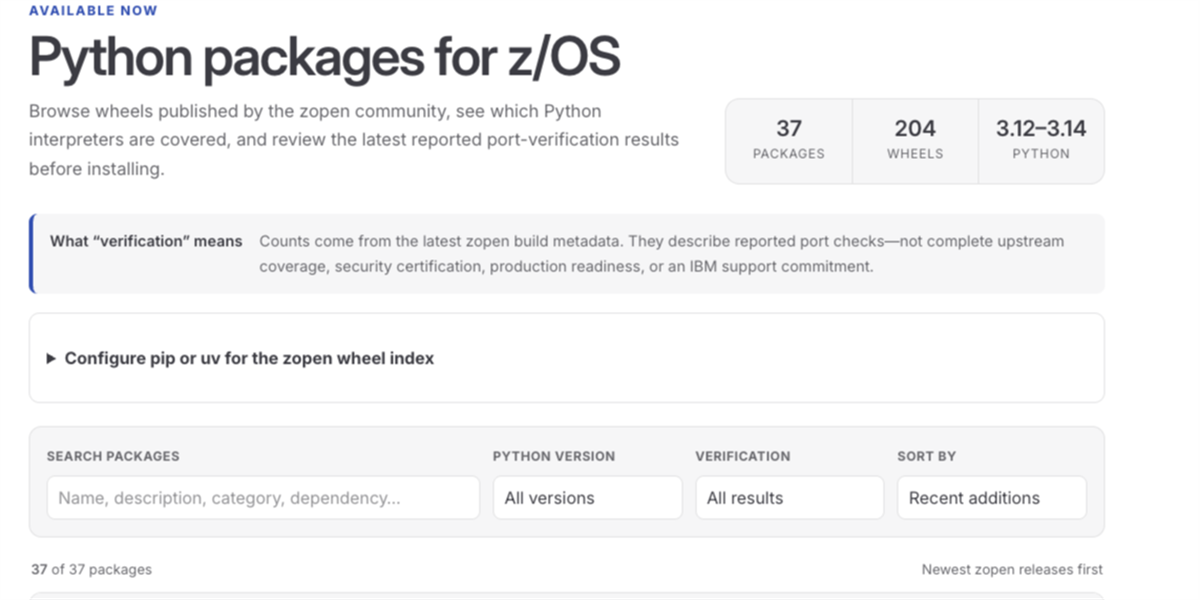
- A Community Native Wheel Repository for z/OS (with an interactive catalog at zopen.community/PythonPackages) featuring 35+ top-used and hard-to-compile packages, with 200+ verified wheels across Python 3.12, 3.13, and 3.14.
- Native Rust Extensions, unlocking modern Python frameworks, including Pydantic, watchfiles, and rpds-py.
- Native uv Support, bringing Astral’s blazing-fast Rust package manager directly to the mainframe.
- Modern Security, AI & Data Tooling, from Cryptography v50 and Paramiko v5 to Model Context Protocol (FastMCP), FastAPI, Django, NumPy, pandas, and scikit-learn.
1. Community Wheel Repository for z/OS
Rather than forcing every mainframe developer to wrestle with compilers, C headers, and complex build scripts on each LPAR, the Zopen Community now publishes statically linked, platform-optimized binary wheels hosted via Pulp.
- Wheel Index (PEP 503 compliant): https://repo.zopen.community/pypi/wheels/simple/
- Browsable Wheel Directory: https://repo.zopen.community/pulp/content/wheels/
- Interactive Package Catalog: https://zopen.community/PythonPackages
- Automated Constraints File: https://repo.zopen.community/pulp/content/constraints/zopen-constraints.txt
Every package in the repository is built and tested on z/OS across Python 3.12, 3.13, and 3.14, running through on-platform test suites to verify that the compiled extensions load and execute cleanly under IBM z/OS UNIX runtime constraints.
2. Rust-Powered Packages Are Live (Including Pydantic!)
One of the biggest obstacles in modern Python has been the shift toward Rust-based core extensions. Mainframe users were previously shut out from the next generation of Python tooling because these packages could not be installed out of the box.
We have broken through this barrier. Critical Rust-backed libraries are now available as verified wheels ready to install directly on z/OS:
- pydantic-core (v2.46.4): Powers Pydantic v2, the foundation for modern data validation, serialization, and typing in Python.
- rpds-py: Rust-backed persistent data structures (unblocking jsonschema and modern schema validation).
- watchfiles: High-performance file watching with a Rust core.
- bcrypt (v5.0.0): Modern password hashing backed by Rust.
- maturin (v1.14.1): Build and packaging tool for Rust-backed Python wheels.
Modern frameworks like FastAPI and Pydantic can now run natively on z/OS with the full performance benefits of their underlying Rust engines.
To learn how zopen-build automates multi-interpreter builds and packaging with maturin, check out our technical guide: Porting Python Packages to z/OS.
3. uv Now Runs Natively on z/OS
Managing Python environments on z/OS just got 10x to 100x faster.
uv, the ultra-fast Python package and project manager written in Rust, has been ported to z/OS and is available directly through zopen.
If you don’t have the zopen package manager installed yet, you can get it in seconds with this quick one-liner:
bash -c "$(curl -fsSL https://raw.githubusercontent.com/zopencommunity/meta/HEAD/tools/zopen_install.sh)"(For prerequisites and manual install options, visit the zopen Quick Start Guide.)
With zopen active, install uv:
zopen install uvWith uv, dependency resolution is virtually instantaneous, virtual environments spin up in milliseconds, and wheel extraction is parallelized and optimized.
Furthermore, uv on z/OS handles platform tag detection across generations: Python 3.12 and 3.13 report os390-29.00-8561, while Python 3.14 reports zos. uv recognizes both seamlessly.
4. Unlocking the Security, AI, and Microservice Ecosystem
Having native wheels for foundational packages triggers a domino effect across the entire Python ecosystem:
- Full Security & SSH Protocol Stacks: With cffi, Cryptography (v50.0.0), PyNaCl, bcrypt, and pycryptodome all available, tools like Paramiko (v5.0.0) install without friction. Automated SSH workflows, secure SFTP transfers, and remote execution on z/OS are now native and robust.
- AI & Model Context Protocol (MCP): With FastMCP (v4.0.3), you can turn your mainframe into an MCP server in under 20 lines of code. Expose z/OS datasets, TSO commands, RACF queries, or job submission APIs as standard MCP tools directly to AI assistants and LLM agents!
- Data Science & Machine Learning: With native wheels for NumPy (v2.5.2), pandas (v3.0.5), SciPy (v1.18.0), scikit-learn (v1.9.0), and SHAP, you no longer need to extract massive datasets off the mainframe to run analytics. Process and analyze core enterprise data right where it lives.
- Modern APIs & Streaming: FastAPI and Django (v6.0.6) for lightweight APIs and web applications, paired with confluent-kafka and snowflake-connector-python for enterprise event streaming and data warehousing.
Quick Start Guide
Getting started takes less than two minutes:
Step 1: Install uv via Zopen
If you don’t have zopen yet, install it with this quick command:
bash -c "$(curl -fsSL https://raw.githubusercontent.com/zopencommunity/meta/HEAD/tools/zopen_install.sh)"Then install uv:
zopen install uvStep 2: Configure Index, Constraints, and Cache
Add these environment variables to your ~/.profile or active shell:
# Point uv to the zopen PEP 503 index and published constraints
export UV_INDEX="https://repo.zopen.community/pypi/wheels/simple/"
export UV_CONSTRAINT="https://repo.zopen.community/pulp/content/constraints/zopen-constraints.txt"

# Pro-tip: Keep package caches off small $HOME (/u) filesystems to prevent out-of-space errors
export UV_CACHE_DIR=/tmp/uv-cache
Prefer traditional pip?
SetPIP_EXTRA_INDEX_URL="https://repo.zopen.community/pypi/wheels/simple/",PIP_CONSTRAINT="https://repo.zopen.community/pulp/content/constraints/zopen-constraints.txt", andPIP_CACHE_DIR=/tmp/pip-cachewith the exact same values.
Why do you need the Constraints file?
Base z/OS Python installations frequently bundle an outdated copy of Cryptography 3.3.2. If you run a bare pip install cryptography, pip inspects the environment, sees version 3.3.2, prints “Requirement already satisfied: cryptography”, and exits. You remain trapped on an obsolete library with zero warnings.
Our generated constraints file acts as an authoritative guardrail. It pins packages against the active zopen index, forcing pip and uv to upgrade past obsolete bundled packages while preventing pip from accidentally attempting to compile incompatible upstream source packages from PyPI.
Step 3: Create an Isolated Environment & Install
# Create a virtual environment
uv venv .venv
source .venv/bin/activate

# Install cryptography into a clean, isolated environment
uv pip install cryptography
For complete details on virtual environment isolation, cache configuration, and troubleshooting, read our comprehensive guide: Using Python Packages on z/OS.
Try It Yourself: 4 Quick Demos
1. Modern Encryption (Cryptography v50)
uv pip install cryptography
python -c "
from cryptography.fernet import Fernet
key = Fernet.generate_key()
cipher = Fernet(key)
token = cipher.encrypt(b'Secure z/OS Payload')
print('Encrypted token:', token)
print('Decrypted text:', cipher.decrypt(token).decode())
"
2. Data Validation & Type Safety (Pydantic v2)
uv pip install pydantic
python -c "
from pydantic import BaseModel, Field
from datetime import date

class MainframeJob(BaseModel):
    job_id: str = Field(..., pattern=r'^JOB\d{5}$')
    owner: str
    run_date: date
    priority: int = Field(default=1, ge=1, le=15)

job = MainframeJob(job_id='JOB01234', owner='SYSADM', run_date=date.today(), priority=5)
print('Pydantic v2 Validated Object:', job)
print('JSON Serialization:', job.model_dump_json())
"
3. High-Performance File Watching (Watchfiles)
Tip for IBM z/OS UNIX: Set
WATCHFILES_FORCE_POLLING=truebecause z/OS does not have Linux inotify or BSD kqueue kernel events.
uv pip install watchfiles
export WATCHFILES_FORCE_POLLING=true

python -c "
from watchfiles import watch
print('Watchfiles engine loaded successfully under IBM z/OS UNIX polling mode!')
"
4. Enterprise AI & Agent Tooling (FastMCP)
uv pip install fastmcp
python -c "
from fastmcp import FastMCP
import asyncio

mcp = FastMCP('zOS-System-Agent')

@mcp.tool()
def query_system_status(name: str) -> str:
    '''Returns a friendly greeting from IBM z/OS UNIX.'''
    return f'Greetings, {name}! This response was generated natively on IBM z/OS.'

print('Registered MCP Tools:', [tool.name for tool in asyncio.run(mcp.list_tools())])
"
What’s Inside the Repository Today?
As of launch, 37 packages and over 200 verified wheels covering high-demand, hard-to-compile packages are live and ready to use:
| Category | Packages Available |
|---|---|
| AI, MCP & Web Frameworks | fastmcp, fastapi, Django |
| Data Science & ML | numpy, pandas, scipy, scikit-learn, shap |
| Rust-Powered Extensions | pydantic_core (powers pydantic), rpds_py, watchfiles, bcrypt, maturin |
| Security & Cryptography | cryptography (v50.0.0), paramiko (v5.0.0), pycryptodome, PyNaCl, bcrypt |
| Enterprise & Data Integration | confluent-kafka, snowflake-connector-python, psutil |
| Serialization & Compression | lxml, Pillow, PyYAML, Brotli, zstandard, ujson, msgpack, simplejson, xxhash, mmh3 |
| Language & Utilities | cffi, regex, jellyfish, zope.interface, MarkupSafe, versioneer, cookiecutter |
Check out the full live catalog with verification results at zopen.community/PythonPackages.
Need an Unlisted Package? Here’s How to Get Involved
If you need a Python package for your enterprise workload that isn’t yet in the index, here is the prioritized path to check its status, vote for it, or contribute:
- Step 1: Check On-Platform Status
Start by visiting Candidate Status. This report tracks actual installation attempts on z/OS. Many packages that lack wheels on PyPI actually build and install cleanly from source without requiring a port, while others are tracked alongside the native blockers (like cffi or numpy) they depend on. - Step 2: Propose or Upvote on the Request Board
If your package isn’t working, head over to the Package Request Board. You can search existing requests, upvote packages, or propose new ones. Community voting directly drives our porting priorities! - Step 3: Contribute or Port a Package
Ready to help bring a package to z/OS?- Read Contributing Python Packages for the end-to-end workflow: from establishing whether a port is needed to requesting a repository and maintaining releases.
- Follow Porting Python Packages for buildenv configuration, zopen-build Python integration, interpreter matrices, building Rust extensions, and testing outside the source tree.
Community Governance & Commercial Support Options
About the Zopen Community
Started in 2022 to bridge the gap between traditional mainframe environments and modern open-source tooling, the Zopen Community (originally z/OS Open Tools) has ported over 200+ essential development tools and utilities to IBM z/OS UNIX, from git, bash, and curl to cmake, ninja, and GNU compilers.
In October 2024, the initiative officially joined the Open Mainframe Project (OMP), hosted under the Linux Foundation. Being part of the Linux Foundation and OMP provides the community with a neutral governance structure, broad industry reach, and the open-source sustainability needed to advance modern software on z/OS.
The project operates under an open governance model guided by an independent Technical Steering Committee (TSC). By design, community packages are maintained collaboratively by volunteers, individual contributors, and participating organizations on an open-source, best-effort basis without commercial warranties, guarantees of fitness, or service-level agreements (SLAs). Contributions from participating developers do not turn community packages into supported products of their employers.
Commercial Support & Production Environments
For mission-critical production environments, financial institutions, and regulated enterprises running workloads on mainframe, commercial backing and formal support arrangements are often mandatory.
Need an IBM-supported Python solution? Check out the Python® AI Toolkit for IBM® z/OS®.
The Python AI Toolkit for IBM z/OS is a separate, open-source offering that provides its own curated collection of Python packages built and vetted for vulnerabilities by IBM. It offers a direct commercial pathway to obtain 24/7 Service & Support through IBM Shopz, allowing enterprise teams to leverage modern open-source Python packages with official IBM support, guaranteed SLAs, and compliance peace of mind. (Note: Zopen Community packages are independent community ports and are not covered under IBM Python AI Toolkit support).
Python on z/OS Resources in the Zopen Community:
To support this milestone and provide developers with end-to-end technical guidance, the Zopen Community maintains a comprehensive documentation suite on zopen.community. Whether you are creating an isolated virtual environment, checking compatibility for an enterprise dependency, or porting a C or Rust extension, these five guides cover every phase of the development lifecycle:
- Available Python Packages: An interactive, searchable catalog of all published z/OS wheels, showing interpreter coverage across Python 3.12, 3.13, and 3.14, along with verified on-platform test results and exact installation strings.
- Using Python Packages: The definitive consumer guide detailing modern virtual environments, uv and pip configuration, constraints management, static linking sizes, and IBM z/OS UNIX filesystem best practices.
- Candidate Status: A live verification matrix based on real test installations on z/OS, tracking which packages work out-of-the-box and which shared blockers (such as cffi or numpy) are being actively ported.
- Contributing Python Packages: The complete contribution roadmap: how to verify whether an upstream package needs a port, test consumer paths, and submit a new port repository.
- Porting Python Packages: The technical engineering reference for maintainers: configuring zopen-build, handling multi-interpreter matrices, building Rust extensions with maturin, and testing outside the source tree.
Join the conversation on the System Z Enthusiasts Discord or in GitHub Discussions.
Welcome to modern Python on z/OS!
